
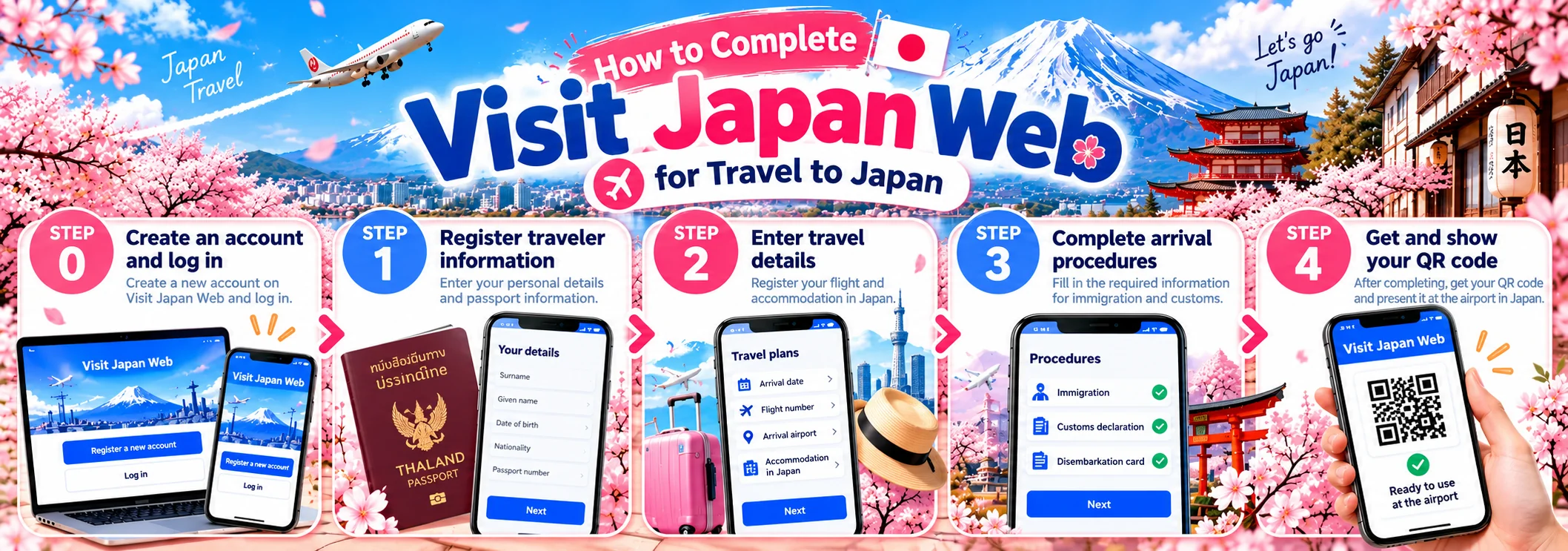
How to Complete Visit Japan Web for Travel to Japan
A step-by-step guide to completing Visit Japan Web, from creating an account and registering passport information to entering travel details and preparing your QR code before traveling to Japan.
What Is Visit Japan Web?
Visit Japan Web is an online service provided by Japan’s Digital Agency. It is designed for travelers entering Japan from overseas and Japanese nationals or residents returning to Japan.
The system allows travelers to register information required for entry procedures, including immigration clearance and customs declaration. It also provides a tax-free shopping-related function for eligible travelers.
Completing the required information in advance allows you to prepare before your trip and check that your details are correct before arriving at the airport.
Do You Need to Complete Visit Japan Web Before Traveling to Japan?
Visit Japan Web allows travelers to register information for Japan’s entry procedures in advance.
If you plan to use the system, it is recommended that you complete the registration before departure. This gives you time to review your information and prepare your QR code for use when you arrive in Japan.
Entry requirements and required travel documents depend on your nationality, purpose of travel, and individual circumstances. Visit Japan Web does not replace a visa or guarantee permission to enter Japan.
What Do You Need Before Completing Visit Japan Web?
Before starting the registration process, prepare the following information:
-
Your passport
-
An email address for creating an account
-
Your flight details
-
Your arrival date in Japan
-
Your accommodation details in Japan
-
Information required for immigration procedures
-
Information required for customs declaration
Having these details ready can make the registration process easier and help reduce the risk of entering incorrect information.
How to Complete Visit Japan Web
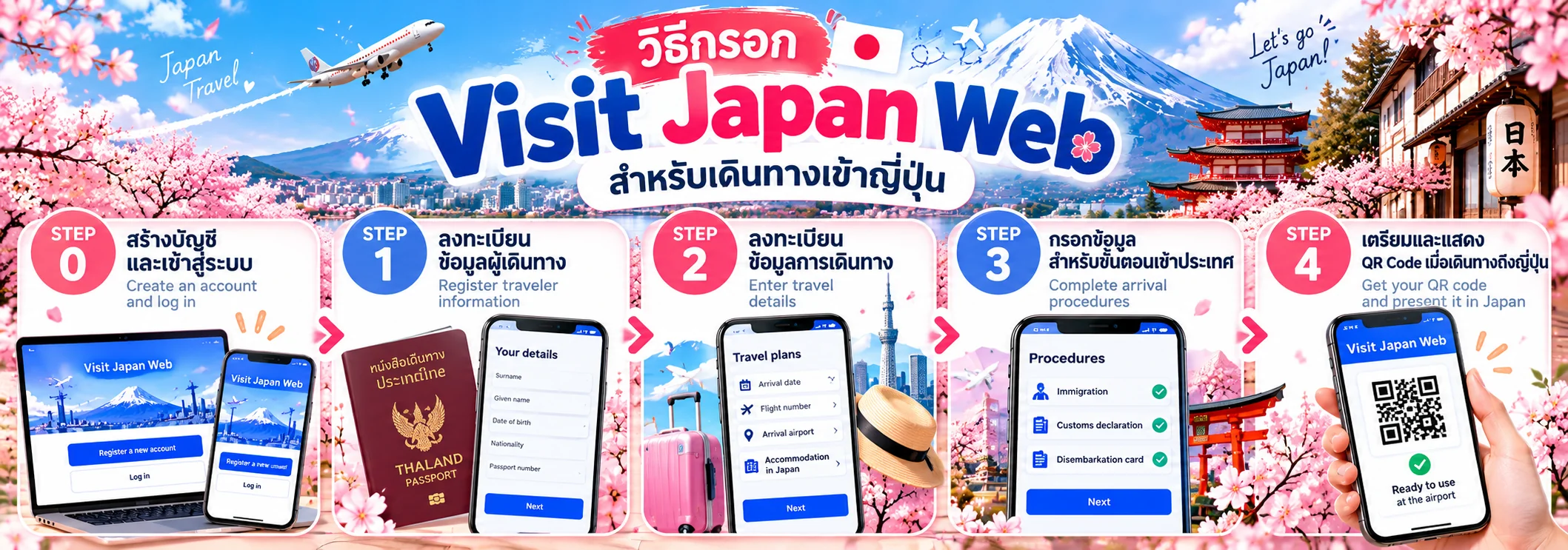
The Visit Japan Web process can be organized into STEP 0–4. Steps 0–3 can be completed before departure, while Step 4 involves presenting your QR code when you arrive in Japan.
STEP 0 — Create an Account and Log In
First, visit the official Visit Japan Web website and select the option to create a new account.
You will need an email address to register. Follow the on-screen instructions to set up your login details and sign in to your account.
Make sure you use an email address that you can access, as it may be needed for account verification or account management.
STEP 1 — Register Traveler Information
After logging in, register your traveler information by selecting the relevant option for yourself and entering the details requested by the system.
Passport Information
You can enter your passport details using either of the following methods:
-
Scan your passport using your device's camera.
-
Enter your passport information manually.
If the passport scanning function does not work, you can enter the information manually.
Before continuing, carefully check that your first name, surname, passport number, date of birth, and other details match your passport exactly.
Note: If you intend to use Visit Japan Web's Tax-Free Shopping function, passport scanning is required as part of the system's registration process.
STEP 2 — Register Your Travel Schedule
After registering your traveler information, create a travel itinerary for entering or returning to Japan.
Enter the relevant travel details requested by the system, such as:
-
Your arrival date in Japan
-
Your flight information
-
Your arrival airport or port of entry
-
Your contact information and accommodation details in Japan, where required
Visit Japan Web allows you to create a new travel schedule and, in certain cases, use previously registered information.
Before saving, check that your travel date and flight details are correct.
STEP 3 — Complete the Entry Procedures
Once your travel schedule has been created, select the relevant itinerary to access the entry procedure registration section.
The system will display the procedures you need to complete. These may include information for immigration clearance and customs declaration.
Read each question carefully and provide accurate answers based on your actual travel circumstances.
Review your answers before submitting the information to ensure that all required sections have been completed correctly.
STEP 4 — Prepare and Present Your QR Code Upon Arrival in Japan
After completing the required registration and checking your information, return to the entry procedure section to display your QR code.
As of January 25, 2024, Visit Japan Web has combined the QR codes for immigration clearance and customs declaration into a single QR code. Therefore, older guides showing two separate QR codes may no longer reflect the current system.
When you arrive in Japan, you can use the QR code at the relevant immigration and customs procedures, depending on the facilities and instructions at your arrival airport.
View the Visit Japan Web QR Code Guide
What Should You Check Before Departure?
Before leaving Thailand, review your Visit Japan Web registration carefully. Pay particular attention to the following details:
-
Your name and passport information
-
Your date of birth
-
Your passport number
-
Your travel date
-
Your flight details
-
Your accommodation information
-
Your immigration information
-
Your customs declaration
Make sure that the information entered in the system matches your actual travel documents. This can help reduce potential issues during arrival procedures in Japan.
What Should You Do When You Arrive at a Japanese Airport?
After arriving in Japan, open Visit Japan Web and display the QR code you prepared during registration.
According to Japan's Digital Agency, the QR code can be used for immigration procedures and customs declaration at supported airport checkpoints or electronic declaration terminals.
Keep your phone accessible and make sure you can open your Visit Japan Web registration when you arrive at the airport.
As a precaution, you may also wish to keep your passport and other required travel documents readily available throughout the arrival process.
Official Visit Japan Web Website
Always use the official website when registering your information.
Visit Japan Web:
https://www.vjw.digital.go.jp/
Visit Japan Web is an official online service provided by Japan's Digital Agency for registering information related to entry procedures. Check the official website for the latest instructions before using the service.
Important Things to Know About Visit Japan Web
Visit Japan Web is a system for registering information related to entry procedures. It is not a visa and does not guarantee that a traveler will be permitted to enter Japan.
Travelers must still comply with Japan's immigration regulations, customs requirements, and entry conditions applicable to their nationality and purpose of travel.
The system's procedures and functions may change over time. Always check the latest information on the official Visit Japan Web website before your trip.
Summary: How to Complete Visit Japan Web
You can prepare your Visit Japan Web registration before traveling to Japan by following these steps:
STEP 0
Create an account and log in.
STEP 1
Register your traveler information and passport details.
STEP 2
Register your travel schedule.
STEP 3
Complete the required entry procedure information.
STEP 4
Display your QR code when you arrive in Japan.
Preparing your information in advance and checking your details carefully can help you get ready for the entry procedures at your destination.
Explore More Japan Travel Guides
Planning a trip to Japan? Explore our Japan travel guide for popular destinations, travel preparation tips, and helpful information before departure.
Plan Your Trip to Japan with Yahweh Booking
Yahweh Booking helps make travel planning easier by providing flight bookings, hotel reservations, travel insurance, and useful information to help you prepare for your journey.
Start planning your trip to Japan with Yahweh Booking today.